Your cart is empty.

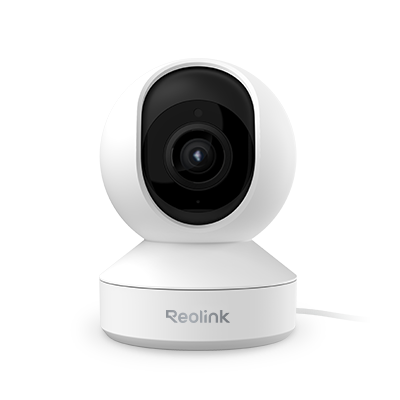
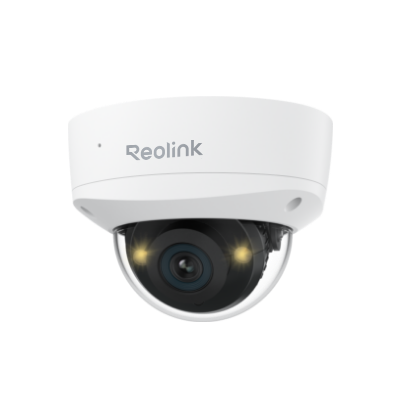
An indoor security camera is a compact surveillance device designed to monitor living spaces, nurseries, pet areas, and home offices from a smartphone or desktop app. At Reolink Canada, our indoor security cameras offer complete setup flexibility, whether you need a plug-in indoor Wi-Fi camera for your living room, a pan-and-tilt pet monitor, or a hardwired indoor PoE camera for your home office. Enjoy crystal-clear 4K UHD resolution, two-way audio, smart pet/person AI detection, and 100% subscription-free local recording.
No Product Found
Indoor monitoring requires pinpoint accuracy to prevent constant false alert noise. Reolink indoor security cameras process AI detection locally on the camera hardware to instantly distinguish between family members, pets, and unexpected movement. Receive instant, relevant mobile alerts with noise-canceling two-way audio, all without paying a mandatory monthly subscription fee.
Capture every corner of your room with crystal clarity. Ranging from 3MP up to 4K Ultra HD resolution, Reolink indoor cameras feature high frame rates to eliminate motion blur. With hardware options including 360° pan-and-tilt tracking, you can easily monitor expansive living areas or nursery beds without blind spots.
Keep indoor family moments completely private. Reolink indoor security cameras store video locally on an internal microSD card (up to 512GB) or sync wirelessly to a central Reolink Home Hub or NVR. Built-in physical privacy masks and local encryption keep your footage under your direct control, free from 3rd-party cloud vulnerabilities.
Find the ideal monitoring setup for any room layout. Choose a dual-band 2.4/5GHz indoor Wi-Fi camera for simple plug-and-play placement on nursery tables, bookshelves, or kitchen counters. For dedicated home offices or commercial spaces, choose a hardwired indoor PoE camera for zero-interference 24/7 video streaming through a single Ethernet cable.
An indoor camera is a home security device designed to monitor indoor spaces such as living rooms, nurseries, entryways, and offices.
The best indoor security camera for Canadian homes should offer clear video, reliable Wi-Fi, smart detection, night vision, and easy remote access.
Yes. A wireless camera indoor setup is worth it if you want flexible installation, remote viewing, and simple home monitoring without complex wiring.
For optimal indoor monitoring and family privacy, follow these placement guidelines:
Main Entryways & Hallways: Mount cameras near front or back doors to capture anyone entering or exiting your home.
Living Rooms & Common Areas: Place Pan & Tilt cameras on high shelves or mantlepieces to monitor open floor plans without blind spots.
Nurseries & Pet Zones: Position plug-in Wi-Fi cameras near cribs or pet beds for real-time monitoring and two-way audio check-ins.
Privacy Protection: Avoid placing cameras directly facing bathrooms or private sleeping quarters. Use Reolink’s software privacy masking or schedule automatic sleep modes when family members are home.
Selecting an indoor camera depends on room size, privacy preferences, and wiring access:
Power & Connection Type: Choose a plug-in Wi-Fi security camera for easy placement near wall outlets in bedrooms or living rooms. If you want zero wireless interference for a home office, select an indoor PoE camera that runs power and data through a single Ethernet cable.
Fixed Lens vs. Pan & Tilt: A fixed-lens camera is ideal for monitoring a specific entryway or hallway. A Pan & Tilt camera (like the Reolink E1 Series) offers 360° rotation to cover wide living spaces or automatically track roaming pets.
Smart AI & Two-Way Audio: Look for local person and pet detection so you only receive meaningful alerts, along with noise-canceling two-way audio to check in with family members or pets remotely.
Storage & Privacy: Ensure your camera supports local storage on a microSD card or a central Reolink Home Hub so your video history stays private with zero monthly cloud fees.


Be Prepared, Be Ahead
Never miss Reolink hot deals, news, and updates tailored for you.
Be Prepared, Be Ahead
Never miss Reolink hot deals, news, and updates tailored for you.

Google, Google Play, Google Assistant and related marks and logos are trademarks of Google LLC. Amazon, Alexa and all related logos are trademarks of Amazon.com, Inc. or its affiliates. Mac and Safari are trademarks of Apple Inc. App Store is a service mark of Apple Inc., registered in the U.S. and other countries. Firefox and the Firefox logo are trademarks of the Mozilla Foundation in the U.S. and other countries. Other product and company names mentioned herein may be trademarks of their respective companies.