Your cart is empty.

Shop the best wireless security cameras and Wi-Fi NVRs from Reolink Canada. Enjoy 24/7 continuous power and fast dual-band connectivity without the hassle of running network cables through your walls. Whether you need an indoor monitor, a weather-resistant outdoor Wi-Fi camera, or a complete wireless recording hub, setup is incredibly easy. Simply plug your new Wi-Fi camera or NVR into a standard power outlet, connect to your network, and experience crystal-clear 4K UHD coverage. Explore our top-rated wireless cameras and systems today for reliable, uninterrupted protection!
No Product Found
Stream lag-free 4K video across your property. Reolink wireless Wi-Fi cameras combine high-speed 2.4GHz and 5GHz dual-band Wi-Fi 6 for fast file transfers and wall penetration. Unlike closed competitor ecosystems, our outdoor Wi-Fi security cameras support open ONVIF and RTSP protocols, giving you the freedom to integrate your devices with 3rd-party platforms like Home Assistant, Synology, or Blue Iris.
Eliminate dead batteries and dropped event clips. Designed for continuous AC power, Reolink plug-in Wi-Fi cameras draw uninterrupted electricity from standard outlets, capturing high-bitrate video 24/7. Whether you need a discreet Reolink indoor camera or a heavy-duty outdoor Wi-Fi camera, you get reliable surveillance without motion-wake delays or battery recharges.
Protect your footage without paying mandatory cloud fees. A complete Reolink wireless Wi-Fi camera system syncs video streams wirelessly to an onboard microSD card (up to 512GB), a Reolink Home Hub (2TB HDD), or a dedicated Wi-Fi NVR (up to 4TB). Enjoy multi-channel local recording, encrypted playback, and real-time mobile alerts with 100% subscription-free video ownership.
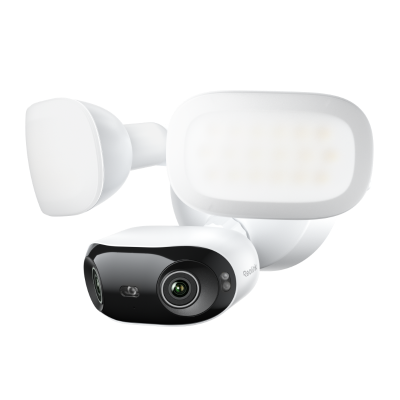
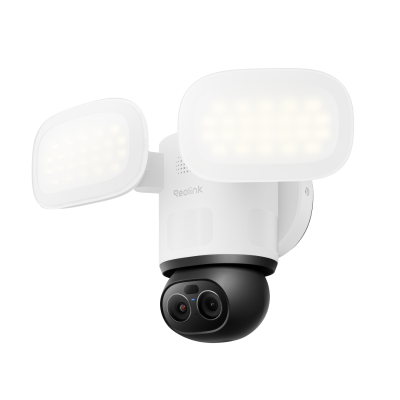
Secure difficult angles without running network cables through your walls. Reolink offers versatile hardware designs for complete wireless camera surveillance including 180° panoramic dual-lens coverage, 360° pan-tilt tracking, bright motion floodlights, and smart video doorbells. Homeowners get total property protection over their home Wi-Fi network with flexible mounting options for driveways, entryways, and backyards.
A WiFi camera provides a Canadian house a simple method of monitoring the front door, driveway, garage, and the backyard, without having to cut long cable trenches through wood, brick, and insulation.
After the camera is connected to the home network, live video is displayed on any phone, tablet, or computer within the house or five provinces distant.
Winter temperatures in Canada can drop to minus thirty, but a proper WiFi camera outdoor model will continue recording because it is powered continuously and features IP66 or higher-rated housing. Daytime vision remains up to 4K UHD resolution and the vision of the night reaches up to thirty meters when the yard is lit just by the moonlight on white snow.
To select the best Wi-Fi security camera for your property, evaluate these key factors:
Bandwidth & Wi-Fi Bands: For smooth 4K video playback, choose a camera supporting dual-band 2.4/5GHz Wi-Fi or Wi-Fi 6. The 5GHz band handles high-data video streams effortlessly, while 2.4GHz offers longer range through thick exterior walls.
Power Source: If you want continuous 24/7 recording without maintaining batteries, choose a plug-in wired model. If you lack nearby power outlets or rent your home, consider a wire-free battery-powered camera.
Storage Method: Decide whether you prefer standalone storage via a microSD card on the camera, or centralized local recording using a Reolink Home Hub or multi-camera security camera system.
Form Factor & Lens: Select Bullet or Spotlight cameras for driveway deterrents, Pan & Tilt models for 360° yard coverage, or dual-lens models for expansive 180° panoramic views.
Even the strongest camera fails if it stares at a wall or sits too high to identify a face. Canadian yards often include a front walk, a side driveway, a back deck, and a shed that hides expensive snow blowers. A short plan saves hours of ladder work in the cold.
- Front door: Mount the unit eight feet high, angled fifteen degrees down, so the lens catches a visitor’s full body and the mail slot.
- Driveway: Place a WiFi camera outdoor model on the garage soffit, aimed at the parked cars. This spot records license plates even at night when headlights wash out cheaper models.
- Backyard gate: Face the lens toward the gate latch so you see anyone who enters from the lane.
- Shed or workshop: Point a small bullet camera at the door of the garden shed where you store chainsaws and bicycles.
- Basement walkout: Many Canadian houses have a below-grade door that opens to the backyard. A camera here watches for break-ins that avoid the main floor windows.
- Second-story corner: One corner unit can cover both the side yard and the neighbor’s fence, cutting down the total number of cameras.
A no WiFi security camera sends video through a coax cable or a PoE network wire to a recorder that sits in a closet. Installation means pulling cables through walls, attics, and soffits, a job that often needs a professional and a day of labor.
A WiFi camera still needs power, but the video travels through the air. You mount it, open an app, scan a code, and the image appears on your phone in two minutes. You can speak, Zoom, download, and share a clip before the police car arrives. The downside is that the camera stops if the router fails, and every clip uses a slice of the monthly data cap.
A no WiFi security camera keeps recording to its hard drive even when the internet dies, but getting it set up can be tricky for first-time users. In short, choose WiFi when you value quick setup and remote access; choose wired when you want stable perfomance or absolute isolation from the web.
The best Wi-Fi security camera for Canada has an IP66 or higher winter rating, records at least 2K resolution, connects to both 2.4 GHz and 5 GHz bands, supports video storage on a MicroSD card, and meets the needs of every Canadian home. Reolink offers models that meet these criteria for under two hundred dollars per unit.
A Wi-Fi camera stops recording when the router loses power, takes up more bandwidth if you set it to 4K, and can lag in cold weather if the signal must pass through two exterior walls. And any weak password invites hackers. You must still run a power cable or recharge a battery every few months.
Yes. A modern Wi-Fi camera gives sharp video, instant phone alerts, and simple setup at a fair price. It works in deep snow, talks to visitors, and scares off porch pirates. For most Canadian homes, it is the fastest way to add protection without tearing open walls.
Reolink offers complete wireless (WiFi) security camera systems that can seamlessly integrate both indoor and outdoor cameras on the same network, such as the RLN12W or the Reoink Home Hub. These wireless NVRs can enable you to easily manage multiple cameras from a single app. Since all our wireless (WiFi) cameras connect to your standard 2.4GHz or 5GHz home network, you can mix and match versatile indoor monitors with rugged outdoor models. This allows you to create a unified, whole-home surveillance solution without running cables through your walls.
You can buy premium wireless (WiFi) security cameras with advanced night vision directly at the official Reolink Canada online store. Our extensive lineup features top-rated indoor and outdoor models equipped with infrared night vision and full-color night vision capabilities. Whether you need a discreet camera with IR LEDs or a powerful floodlight model to illuminate your driveway, shopping directly with us guarantees you get reliable local support and industry-leading 4K UHD clarity.
Neither setup is universally superior. The right choice depends on your home’s wiring access and your security goals:
- Choose Wi-Fi Security Cameras if: You want a fast, DIY installation without running Ethernet cables through attics or basements. Plug-in Wi-Fi models offer flexible mounting near any outlet and deliver ultra-high 4K video over your home wireless network.
- Choose Hardwired PoE Cameras if: You are building a permanent multi-camera setup, want total immunity from Wi-Fi signal interference, or need uninterrupted 24/7 NVR recording across wider properties.


Be Prepared, Be Ahead
Never miss Reolink hot deals, news, and updates tailored for you.
Be Prepared, Be Ahead
Never miss Reolink hot deals, news, and updates tailored for you.

Google, Google Play, Google Assistant and related marks and logos are trademarks of Google LLC. Amazon, Alexa and all related logos are trademarks of Amazon.com, Inc. or its affiliates. Mac and Safari are trademarks of Apple Inc. App Store is a service mark of Apple Inc., registered in the U.S. and other countries. Firefox and the Firefox logo are trademarks of the Mozilla Foundation in the U.S. and other countries. Other product and company names mentioned herein may be trademarks of their respective companies.