Your cart is empty.

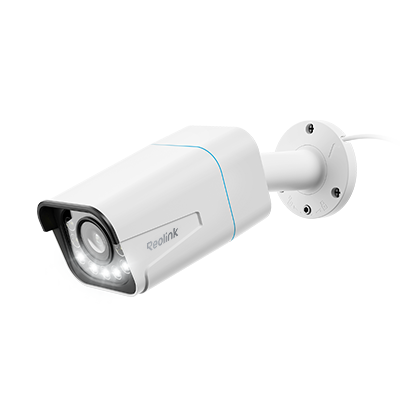
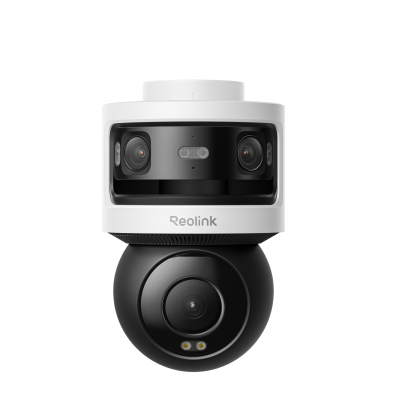
An outdoor security camera without a subscription is a surveillance device that stores recorded video locally on an internal microSD card or NVR, providing full access to smart features without recurring cloud fees. At Reolink Canada, our subscription-free outdoor security cameras deliver crystal-clear resolutions from 4K(8MP) up to 16MP Ultra HD, on-device AI detection, and full-color night vision across hardwired PoE, plug-in Wi-Fi, and 100% wire-free solar models. Choose Reolink to protect your driveway, front porch, or backyard with complete video ownership and zero monthly paywalls today!
No Product Found
Don't settle for crippled hardware. Instead of withholding essential smart motion alerts and video playback behind mandatory $5 to $15 monthly subscriptions, Reolink unlocks full functionality out of the box! Enjoy highly accurate person, vehicle, and animal detection, two-way audio, and instant mobile push notifications with zero recurring fees.
Keep your property’s video history off vulnerable third-party cloud servers with Reolink's secure local storage options. Either record motion events directly to a weatherproof on-camera microSD card (up to 512GB), sync to a Reolink Home Hub, record 24/7 to an NVR. All fully encrypted!
Cloud-based cameras often compress video quality to save server space, blurring critical details. Because Reolink cameras process and store video locally, they record at true, high-bitrate resolutions up to 16MP Ultra HD. Paired with spotlight color night vision or ColorX technology, you can identify license plates and facial features across dark driveways without paying extra for premium cloud video tiers.
Get subscription-free surveillance exactly where you need it. Our outdoor lineup includes hardwired PoE cameras for ultra-stable 24/7 recording, plug-in Wi-Fi models for easy exterior wall mounting, and 100% wire-free solar/battery cameras to monitor remote fence lines and detached sheds where running power is impossible.
Choose a home security camera without subscription that provides numerous benefits that suit many residential owners. Here are some major benefits:
Cost Savings: Non-subscription cameras eliminate every recurring fee. You will enjoy unlimited free storage and access to all features once you purchase the camera, thus making it an affordable solution in the long run.
No Long-Term Commitments: Your freedom to change hardware becomes restricted through subscription plans because they force you to hold contracts for essential periods. Using a camera without subscription requirements grants users complete freedom from ongoing contracts.
Privacy and Control: The local storage setup lets you keep your recordings private since it protects you from third-party access and you have full control over your data.
Simplicity: With these cameras, you don't have to worry about subscription hassles for account management and renewal procedures. This approach makes the security system easier to set up and maintain.
Selecting the right no-subscription outdoor camera depends on your local climate, property size, and power availability. Here are four key points to consider:
Power & Wireless Setup: If you want continuous 24/7 recording, choose a hardwired PoE camera. If you prefer a fast DIY setup near an electrical outlet, opt for a plug-in Wi-Fi camera. For remote sheds or fence lines without outlets, choose a solar-powered battery camera.
4K Resolution & Night Vision: Select 2K (5MP) or 4K (8MP) resolution to ensure digital zooming reveals clear facial features and license plates. Look for ColorX true full-color night vision to maintain vivid nighttime identification across dark yards.
Canadian Weatherproofing: Ensure an IP66 or IP67 weatherproof rating to seal out driving rain, heavy snow, and freezing winter temperatures down to sub-zero levels.
Local Storage Needs: A standalone camera using a microSD card (up to 512GB) is ideal for motion-only recording. For continuous 24/7 recording across multiple outdoor cameras, pair them with a central NVR security system containing a built-in hard drive.
Your specific security needs determine whether wired or wireless system you should use because subscription plans do not matter in this scenario. You should weigh the benefits of each camera type when making your selection.
Installation Complexity: Wireless cameras win for ease. You don't need to drill holes or run cables, which suits anyone avoiding complex setups. Wired cameras demand more work but deliver a steady connection once installed.
Reliability: Wired cameras stay dependable with a direct link to power and your network. They dodge issues like Wi-Fi dropouts or interference that can plague wireless models, especially over long distances.
Power Source: Wireless cameras often use batteries you recharge or replace now and then. Some tie into solar panels for nonstop power, ideal for off-grid spots. Wired cameras draw power through cables, ensuring they never run dry but limiting where you can place them.
Flexibility in Placement: Wireless cameras go anywhere your Wi-Fi reaches, perfect for renters or shifting needs. Wired cameras stick to where cables can stretch, so you'll need to plan their spots carefully.
Installing and setting up a security camera without a subscription isn't hard. Follow these tips to get it running smoothly:
1. Choose the Right Location: Pick a spot with a clear view of your target area, like a doorway or yard. For outdoor cameras, tuck them under eaves to shield them from rain. Aim for a height that catches faces but stays out of reach—too low invites tampering, too high misses details.
2. Ensure Proper Power Supply: Wired cameras need a nearby outlet or safe cable routing. Wireless ones rely on batteries, so check their charge and consider solar panels if you want less upkeep. Set a reminder to monitor your battery levels.
3. Connect to the Network: Wireless cameras need a strong Wi-Fi signal, so test the range and add an extender if the connection fades. Wired cameras link up with Ethernet cables. Secure your network with a tough password to block hackers.
4. Configure Settings: Use the camera's app or software to tweak motion detection, recording times, and alerts. Set motion zones to skip triggers from cars or pets and enable phone notifications for instant updates.
5. Test the Camera: Run a test to check the view and video quality. Record a clip, watch it back, and adjust the angle or settings if the shot's off or blurry.
Yes, plenty of security cameras skip the subscription requirement. They use local storage like SD cards or NVRs, letting you save footage without monthly fees. For example, Reolink cameras don't require any subscription fees for local storage, high-resolution footage, and AI features.
The top pick varies by need, but brands like Reolink stand out. Reolink no-subscription cameras offer local storage and solid AI features without forcing you into a subscription.
No. Reolink outdoor cameras do not require a subscription for any core features. Smart AI detection (person/vehicle/animal), local video playback, two-way audio, and remote live viewing via the Reolink app are permanently free out of the box. Reolink does offer an optional cloud backup service for select battery models, but it is never required to operate your camera.
To build a budget-friendly, subscription-free 2-camera setup that streams continuously to a dedicated display screen without app session dropouts, follow these steps:
Select a Central Local Hub: Choose a 2-camera starter kit paired with an indoor Reolink Home Hub or a compact 8-channel NVR.
Connect to Any Monitor or TV: Run an HDMI cable directly from the rear port of the Home Hub or NVR into a desktop computer monitor or TV.
Uninterrupted 24/7 Viewing: Unlike cloud-based mobile apps or battery cameras that automatically time out after 5 to 10 minutes to conserve data and battery, a direct NVR or Home Hub monitor feed displays live, multi-camera footage continuously with zero session timeouts and zero monthly fees.


Be Prepared, Be Ahead
Never miss Reolink hot deals, news, and updates tailored for you.
Be Prepared, Be Ahead
Never miss Reolink hot deals, news, and updates tailored for you.

Google, Google Play, Google Assistant and related marks and logos are trademarks of Google LLC. Amazon, Alexa and all related logos are trademarks of Amazon.com, Inc. or its affiliates. Mac and Safari are trademarks of Apple Inc. App Store is a service mark of Apple Inc., registered in the U.S. and other countries. Firefox and the Firefox logo are trademarks of the Mozilla Foundation in the U.S. and other countries. Other product and company names mentioned herein may be trademarks of their respective companies.