Your cart is empty.

An ONVIF security camera and NVR system utilizes open network protocols to integrate seamlessly with third-party video management software (VMS) and external surveillance hardware. At Reolink Canada, our ONVIF security cameras and compatible NVRs grant you complete freedom from closed brand ecosystems. Whether you are connecting an outdoor PoE camera to a third-party NVR, streaming Wi-Fi video to Synology Surveillance Station, or pairing third-party ONVIF cameras with a Reolink NVR, you can build a customized, high-bitrate surveillance network with zero monthly fees.
No Product Found
Tired of hardware that locks you into a single proprietary app? Reolink ONVIF-compliant cameras utilize open network protocols (like RTSP) to communicate directly with your existing infrastructure. Easily pull live video streams at resolutions up to 16MP Ultra HD into popular video management software platforms including Blue Iris, Synology Surveillance Station, and third-party ONVIF NVRs, without relying on external cloud servers.
Integration goes both ways. Integration works both ways. If you are upgrading a home or business security system but want to keep existing third-party ONVIF cameras, Reolink NVRs accept video streams from compliant external hardware. Consolidate mixed-brand cameras into a single, centralized Reolink NVR for unified, 24/7 continuous local recording without throwing away functioning hardware.
Maintain full AI smart detection when integrating with third-party systems. Many Reolink IP cameras support ONVIF Profile T, allowing the camera to process person, vehicle, and animal detection locally on the hardware chip. The camera passes rich motion metadata directly to your supported VMS or NVR, delivering precise motion triggers and filtering out false alarms caused by weather or shadows.
With Reolink, you don't have to choose between complex backend software and convenient everyday mobile access. Our ONVIF cameras support simultaneous dual-streaming. Record continuous, uncompressed video (up to 16MP Ultra HD) directly to your local NVR or NAS server while using the free Reolink app for instant mobile push notifications and live viewing anywhere across Canada.
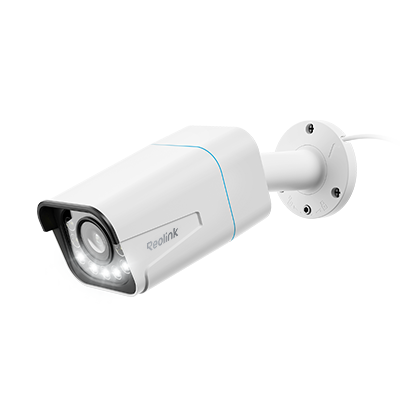
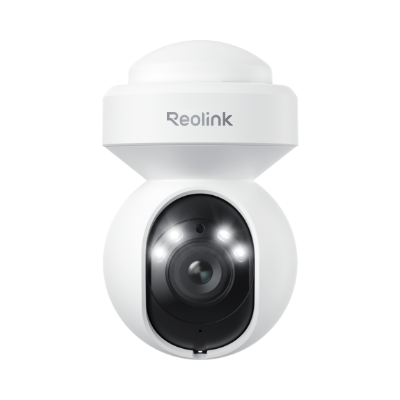
Support depends on the camera type, not the whole lineup. Reolink's PoE and plug-in WiFi models, including the RLC series, E1 Outdoor series, and Duo series, support ONVIF on their own. Battery-powered models like the Argus and Altas series need a Reolink Home Hub to gain ONVIF access, and NVR kit cameras need a Reolink NVR. Check your exact model against Reolink's ONVIF compatibility list before buying for a specific integration.
Yes, most Reolink cameras support ONVIF and RTSP protocols.
Natively Supported: Most Reolink hardwired PoE cameras and plug-in Wi-Fi cameras (excluding NVR kit-only add-on cameras) natively support ONVIF and can stream directly to third-party NVRs and VMS platforms.
Requires a Hub: 100% wire-free battery and solar models conserve power by keeping their network ports closed. However, these battery cameras can achieve ONVIF integration if they are connected and routed through a Reolink Home Hub.
ONVIF profiles dictate which video features pass between the camera and your software or NVR:
Profile S: The legacy standard designed primarily for basic H.264 video streaming and simple pan-tilt-zoom controls.
Profile T: The modern standard engineered for advanced IP surveillance. It supports efficient H.265 compression for 4K video, two-way audio, and rich smart detection metadata (passing person and vehicle alerts directly to software like Blue Iris or Synology). Reolink recommends choosing Profile T for all new installations.
It depends on the model. Wired doorbells like the Doorbell PoE and Duobell WiFi support ONVIF on their own, while the battery-powered doorbell needs a Reolink Home Hub to access it.
Yes, for models that support ONVIF standalone. Reolink publishes step-by-step setup guides for both, adding a Reolink camera to Blue Iris and adding a Reolink camera to Synology Surveillance Station, and the default ONVIF port is 8000 unless you've changed it. Confirm your specific camera model supports ONVIF first, since not every Reolink camera does without a Home Hub or NVR in between.
Yes. Reolink NVR security systems feature open ONVIF support, allowing you to add and record video from compliant third-party IP cameras alongside your Reolink hardware.
What Works: Continuous 24/7 recording, motion detection, multi-channel live viewing, and local storage on the NVR hard drive.
Potential Limitations: Proprietary features specific to third-party brands (such as specialized AI tracking or custom light controls) may not translate through standard ONVIF protocols.


Be Prepared, Be Ahead
Never miss Reolink hot deals, news, and updates tailored for you.
Be Prepared, Be Ahead
Never miss Reolink hot deals, news, and updates tailored for you.

Google, Google Play, Google Assistant and related marks and logos are trademarks of Google LLC. Amazon, Alexa and all related logos are trademarks of Amazon.com, Inc. or its affiliates. Mac and Safari are trademarks of Apple Inc. App Store is a service mark of Apple Inc., registered in the U.S. and other countries. Firefox and the Firefox logo are trademarks of the Mozilla Foundation in the U.S. and other countries. Other product and company names mentioned herein may be trademarks of their respective companies.