Your cart is empty.

Reolink RTSP cameras give you more flexibility to build a customized security system. With RTSP and ONVIF support, these IP cameras can integrate with NVRs, VMS software, and third-party platforms while providing high-quality video, local storage options, and smart security features.
No Product Found
Reolink RTSP cameras work with popular third-party solutions such as NVR systems, Blue Iris, Synology Surveillance Station, Home Assistant, and VLC. With RTSP and ONVIF support, you can combine Reolink cameras with your existing security equipment instead of being limited to one ecosystem.
RTSP streaming sends video directly from the camera to your preferred recording or monitoring platform. Reolink RTSP cameras support flexible storage options, including microSD cards, NVRs, and local recording systems, so you can monitor and store videos without relying on mandatory cloud subscriptions.
Different environments require different installation methods. Reolink offers both PoE and WiFi RTSP cameras to fit various security needs.
- PoE RTSP cameras: Provide a stable wired connection and continuous power. Ideal for 24/7 recording, businesses, and professional surveillance systems.
- WiFi RTSP cameras: Offer easier installation and flexible placement for homes, apartments, and indoor monitoring.
RTSP provides streaming flexibility, but a modern security camera should offer more than just video access. Reolink RTSP cameras combine third-party compatibility with advanced security features, including:
- High-resolution video up to 4K for clearer details
- Person and vehicle detection to reduce false alerts
- Night vision for low-light monitoring
- Two-way audio for remote communication
- Local storage options without monthly fees
This combination makes Reolink cameras suitable for both advanced integrations and everyday home security.
The best RTSP camera depends on your installation needs, coverage area, and preferred connection type.
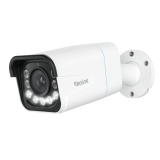
- Best Overall RTSP Camera: Reolink RLC-810A 4K PoE RTSP IP camera with smart detection and RTSP/ONVIF support for NVRs and third-party platforms.
Best for: Home security, offices, and customized surveillance systems.
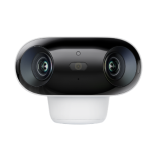
- Best RTSP WiFi Camera: Reolink E1 Zoom Indoor RTSP WiFi camera with pan, tilt, and zoom features for flexible monitoring and easy installation.
Best for: Bedrooms, living rooms, apartments, and indoor monitoring.
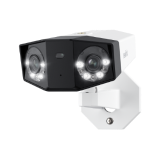
- Best RTSP PoE Camera for Professional Systems: Reolink Duo 3 PoE Dual-lens PoE camera with panoramic coverage and stable wired performance for advanced security setups.
Best for: Large properties, businesses, and wide-area surveillance.
An RTSP camera is an IP camera that uses the Real-Time Streaming Protocol (RTSP) to transmit live video streams to third-party platforms, such as NVRs, VMS software, VLC, and smart home systems.
Unlike cloud-only cameras, RTSP cameras give users more control over how they view, record, and manage video. RTSP is commonly used for security systems that require flexible integration with existing equipment.
An RTSP IP camera sends a live video stream through a network using an RTSP URL. The stream can then be accessed by compatible software or devices, such as an NVR, VMS, media player, or smart home platform. A typical setup works like this:
Camera → Network → RTSP Stream → NVR/VMS Software → Live View & Recording
RTSP handles video streaming, while the connected recording system manages storage and playback.
Yes. Many Reolink cameras support RTSP and ONVIF. allowing integration with third-party NVRs, VMS platforms, and software such as Blue Iris, Synology Surveillance Station, Home Assistant, and VLC. RTSP provides the video stream, while ONVIF helps different security devices communicate and work together for easier system integration.
No. Most web browsers do not support direct RTSP playback because RTSP is not a native browser streaming format.
To view an RTSP camera stream, you can use:
- NVR or VMS software
- VLC media player
- RTSP-to-web streaming solutions
For browser-based viewing, the RTSP stream usually needs to be converted into a web-compatible format such as HLS or WebRTC.
RTSP and RTMP are both video streaming protocols, but they are designed for different purposes. RTSP is mainly used for security cameras, NVRs, and surveillance software because it supports direct IP camera streaming.
RTMP is more commonly used for online broadcasting and live streaming platforms. For security camera systems, RTSP is usually the better choice for continuous monitoring and third-party integration.
A Reolink RTSP URL is the address used by third-party software to access a Reolink camera’s live video stream.
A typical RTSP URL format is: rtsp://<username>:<password>@<IP address>/Preview_<channel number>_<stream type>
The default RTSP port number is 554, which can be left blank by default. But if you have changed the port number, you must fill it in: rtsp://<username>:<password>@<IP address>:Port number/Preview_<channel number>_<stream type>
Yes. RTSP WiFi cameras can be a good option for remote monitoring when you have a stable wireless connection. They are ideal for homes and indoor locations where cable installation is difficult. For continuous recording or professional security systems, PoE RTSP cameras may provide more reliable performance with a wired connection.


Be Prepared, Be Ahead
Never miss Reolink hot deals, news, and updates tailored for you.
Be Prepared, Be Ahead
Never miss Reolink hot deals, news, and updates tailored for you.

Google, Google Play, Google Assistant and related marks and logos are trademarks of Google LLC. Amazon, Alexa and all related logos are trademarks of Amazon.com, Inc. or its affiliates. Mac and Safari are trademarks of Apple Inc. App Store is a service mark of Apple Inc., registered in the U.S. and other countries. Firefox and the Firefox logo are trademarks of the Mozilla Foundation in the U.S. and other countries. Other product and company names mentioned herein may be trademarks of their respective companies.