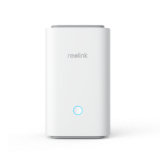
]Reolink Home Hub Series

Filter By

No Product Found

Reolink Home Hub Series brings your compatible security cameras together in one system, offering secure local storage, centralised management, and no monthly subscription fees. From Australian apartments to larger family homes, it provides a flexible way to manage home security.

Secure Local Storage Without Monthly Fees

Store recordings locally without paying for cloud storage subscriptions. Home Hub offers up to 2TB of microSD storage, while Home Hub Pro includes a 2TB HDD expandable to 16TB. AES-128 encryption helps protect your footage and privacy.

Manage Multiple Cameras in One Place

Monitor your front door, driveway, backyard, and garage through a single interface in the Reolink App. View live feeds, review recordings, and manage camera settings without switching between individual devices.

Flexible Camera Compatibility

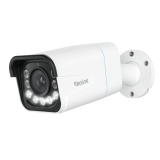
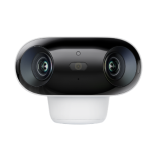
Bring compatible battery-powered Wi-Fi, plug-in Wi-Fi, and PoE cameras into one security system. Combine outdoor cameras, indoor cameras, and video doorbells to cover different areas of your property.

Reliable Wi-Fi and Offline Recording

Dual-band Wi-Fi 6 provides wireless connectivity for compatible cameras. Local recording can continue during an internet outage as long as the hub, cameras, and local network remain powered and connected.

Smart Alerts and Easy Event Review

Quickly review activity around entrances, driveways, and outdoor areas through the Reolink App. Person, vehicle, and animal detection from compatible cameras helps you find relevant footage, while Home and Away modes simplify daily security management.

Scalable Security for Australian Homes

Start with a few cameras to monitor a suburban home's front entrance and backyard, then expand coverage to garages, side passages, and larger outdoor areas. With support for up to 24 cameras and 16TB of storage, the series accommodates growing security needs.
Features Reolink Home Hub Mini Reolink Home Hub Reolink Home Hub Pro
Best For Apartments & small homes Suburban homes & small offices Large homes & multi-camera security systems
Camera Capacity Up to 8 cameras Up to 8 cameras Up to 24 cameras (12 wired)
Local Storage 1 × microSD, up to 1TB 2 × microSD, up to 2TB total 2TB HDD, expandable to 16TB
Included Storage No microSD card 64GB microSD card 2TB HDD
Wi-Fi Connectivity Dual-band Wi-Fi 5 Dual-band Wi-Fi 6 Dual-band Wi-Fi 6
Camera Compatibility Reolink battery-powered Wi-Fi cameras, E Series & Lumus recommended Compatible Reolink Wi-Fi & PoE cameras Compatible Reolink Wi-Fi & PoE cameras
24/7 Recording Yes (Fluent Mode) Yes Yes
Encrypted Local Storage AES-128 AES-128 AES-128
HDMI Output No No Yes
USB Port 1 × USB 2.0 No 2 × USB 2.0
Monthly Storage Fees No No No

What Is Reolink Home Hub?

The Reolink Home Hub is a central hub that integrates and manages various Reolink security cameras. It acts as the main control center and facilitates communication between the cameras and your smartphone.

The Reolink Home Hub series provides secure local storage options via microSD cards or HDD. These hubs also include built-in security features such as encryption for data protection and alarms.

What Are Key Features of the Reolink Home Hub Series?

- Centralized Camera Management: Connects and syncs up to 8 cameras (Standard/Mini) or up to 24 cameras (Pro models).

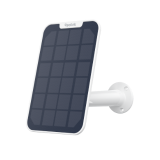
- Multi-Category Compatibility: Supports a diverse mix of Reolink PoE, plug-in Wi-Fi, and low-power battery/solar-powered cameras.

- Subscription-Free Local Storage: Aggregates and stores footage on local microSD cards (expandable to 2TB) or built-in HDDs (expandable to 16TB) with zero monthly fees.

- Bank-Level Data Encryption: Uses AES-128 algorithms to secure video data, preventing unauthorized playback even if the hub or its storage drive is physically stolen.

- Dedicated LAN Isolation: Creates an independent localized wireless network for your cameras to keep heavy video traffic off your primary home Wi-Fi.

- Dual-Band Wi-Fi 6 Support: Features 2.4/5 GHz Wi-Fi 6 connectivity to ensure smooth, lag-free live streaming for ultra-high-definition feeds up to 16MP.

- Built-In Smart Alarm Siren: Houses a powerful speaker (up to 120dB) that triggers audible, customizable alarms whenever a connected camera spots a threat.

- App-Driven UI with Automated Summaries: Delivers a streamlined overview of timeline logs and filters chronological motion events right inside the smartphone app.

What Are the Best Use Cases for Reolink Home Hub Series?

The Reolink Home Hub series bridges the gap between standalone Wi-Fi cameras and complex, hardwired NVR systems. It is the ultimate "brain" for modern, flexible surveillance setups.

- Managing a Mix of Wireless, Solar, and Battery Cameras: Standard security NVRs are notorious for draining battery-powered cameras or failing to support them entirely. The Home Hub is specifically engineered to handle battery, solar, and plug-in Wi-Fi cameras seamlessly, acting as a low-power wireless base station.

- Ecosystem Upgrades for Renters and Apartments: Because it excels with wireless, battery-powered hardware, renters can deploy a complete 4-camera setup (doorbell, patio, hallway, entryway) without drilling into walls for Ethernet cables. When you move, you simply unplug the Hub, pack up the cameras, and take your entire system with you.

- Creating Your Own Local Network: If privacy is a top priority, the Home Hub creates its own localized LAN network. This takes the heavy video traffic off your main home Wi-Fi—preventing internet slowdowns—and keeps your footage safe, encrypted, and accessible even if your main internet service goes down.

- App-Only, Headless Smart Home Enthusiasts: Unlike traditional NVRs that require a dedicated HDMI monitor and a mouse plugged in to configure settings or add cameras, the Home Hub is fully managed right from the Reolink smartphone app. It also features out-of-the-box integration with Google Home, Amazon Alexa, and Home Assistant.

Which Reolink Cameras Are Compatible with Reolink Home Hub?

The Reolink Home Hub and Home Hub Pro are compatible with almost all Reolink, battery-powered, Wi-Fi, and PoE cameras, except for 4G LTE cameras, cameras included in NVR kits, and other add-on cameras.

Make sure your camera model is listed as compatible and has the necessary firmware updates installed before adding it to the Home Hub.

Does the Reolink Home Hub Series Have to Be Connected to the Router?

Yes, the Reolink Home Hub must be connected to your home router with an Ethernet cable during the initial setup process. Your cameras can then be added to the hub via the Wi-Fi network.

How Many Cameras Can I Connect to Reolink Home Hub Series?

The number of cameras you can connect depends entirely on which model from the Reolink Home Hub series you choose:

- Reolink Home Hub (Standard) & Home Hub Mini: Supports up to 8 cameras total.

- Reolink Home Hub Pro: Supports up to 24 cameras total (including up to 12 wired PoE/plug-in Wi-Fi cameras, with the remainder being battery-powered models).

What's the Difference Between Reolink Home Hub and NVR?

The main difference is their storage, connectivity, and intended use. Reolink Home Hub Series focuses on wireless camera management and secure local storage, making it suitable for homes with battery-powered and Wi-Fi cameras. Reolink NVRs are designed for larger, wired security systems, offering multiple camera channels, HDD storage, and continuous 24/7 recording.

Both provide centralised camera management, local storage, and recording without mandatory cloud subscription fees.

For smaller Australian homes using battery-powered cameras, the Home Hub is generally the more convenient option. For larger properties, shops, or warehouses requiring extensive 24/7 surveillance, an NVR is usually more suitable. However, Home Hub Pro also supports HDD storage and up to 24 cameras, so the distinction depends on the specific model.

Is the Reolink Home Hub Worth It?

Yes, especially if you want to simplify daily security monitoring. Features like Home and Away modes, a built-in alarm, and easy event playback make it more convenient to manage your cameras. However, if your current camera setup already meets your needs, adding a Home Hub may offer limited extra value.